2023 · Sense
Smarter questions, cleaner data
I designed the evolution of Sense Chatbot around a preset question library: validated, ready-made questions like email or phone number that the bot already knew how to check. Recruiters built better conversations without guessing, and candidates stopped hitting dead ends on bad input.
- Role
- Lead Product Designer
- Team
- Directors of product and engineering, PM, 3 engineering managers, 7 engineers including 2 in ML
- Timeline
- 2022 to May 2023
- Tools
- Figma, UserTesting
Overview
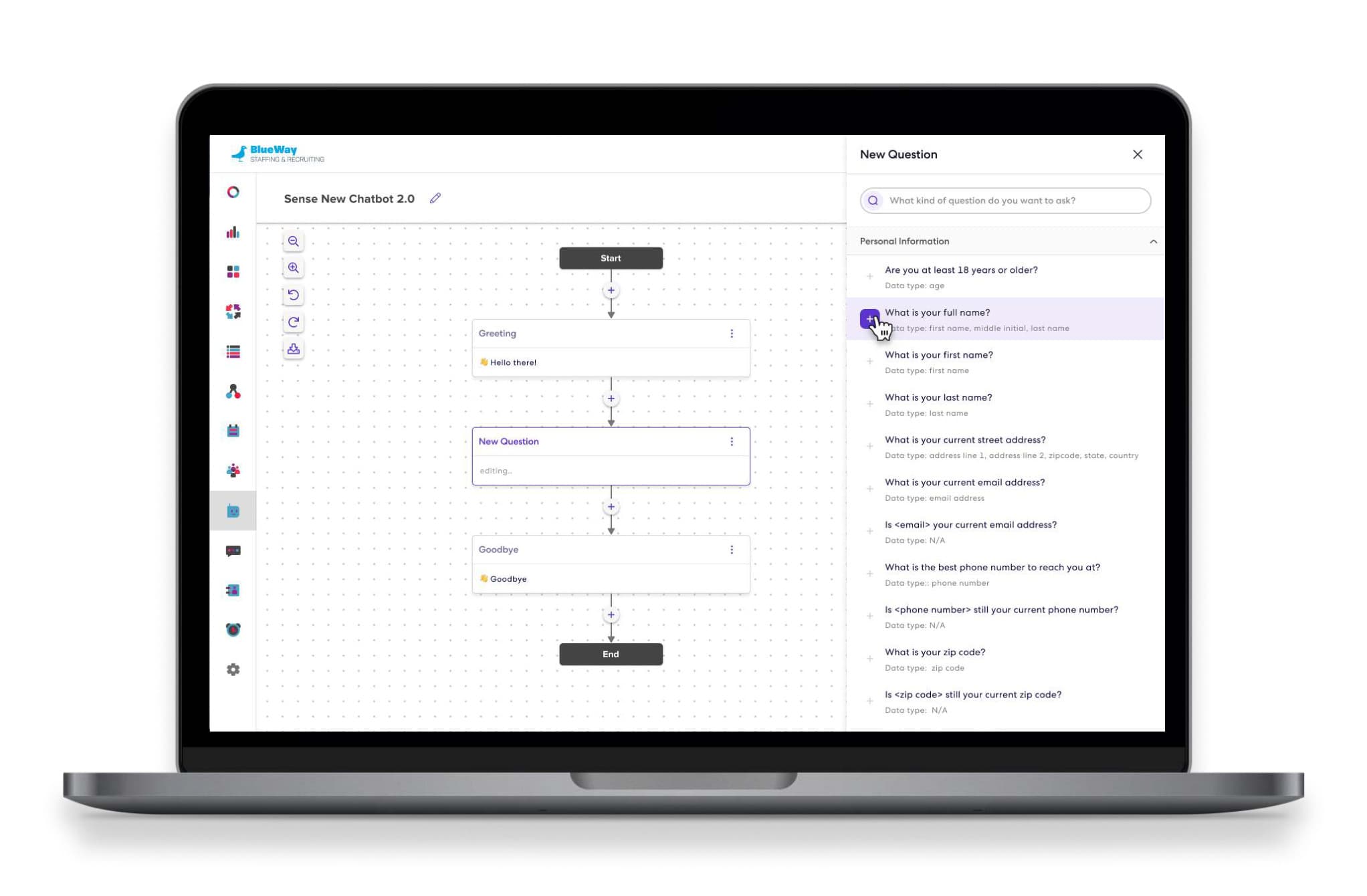
Sense Chatbot 2.0 understands what candidates are asking for, reading natural language, working out the intent, acting on it, and writing what it learns back into the agency’s ATS. This is how we redesigned the tool recruiters use to build it, including the month we could not agree on one field.
Improving the conversation and widening what the bot can do meant higher completion rates, a far better candidate experience, and more value to customers in a market where every recruiting platform was adding a chatbot.
The Problem
Chatbot 1.0 conversations are linear and transactional. The bot leans on buttons, and because it does not comprehend natural language, a candidate who answers in their own words gets the same question again. It feels robotic, and people leave.
- Candidates: no real language understanding, so frustrating exchanges and a robotic feel whenever a button is required.
- Builders: creating a chatbot from scratch felt like too much work, so implementation teams ended up doing it for customers.
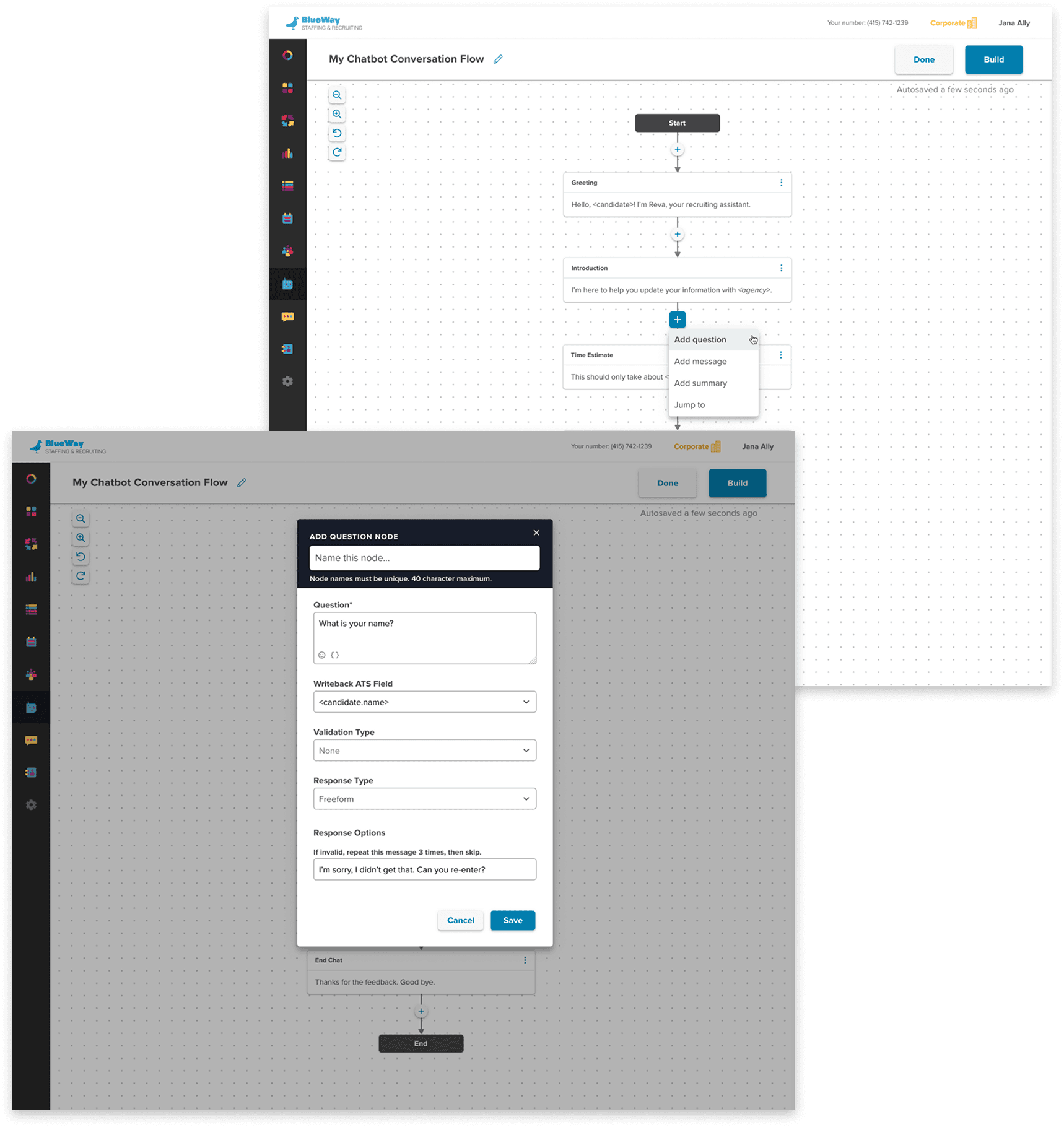
I designed 1.0 from the ground up, and its limits were technical from day one. We needed a field for validating data types, for example, because the bot had no way to detect one. With better ML, 2.0 could collect data accurately based on which preset question was asked, and that field could go.
Teaching the Bot to Listen
The core of the project was an intent recognition model that classifies what a candidate types into categories. While I worked on the design, the ML team kept training it on more intent classes as training data came in from customers.
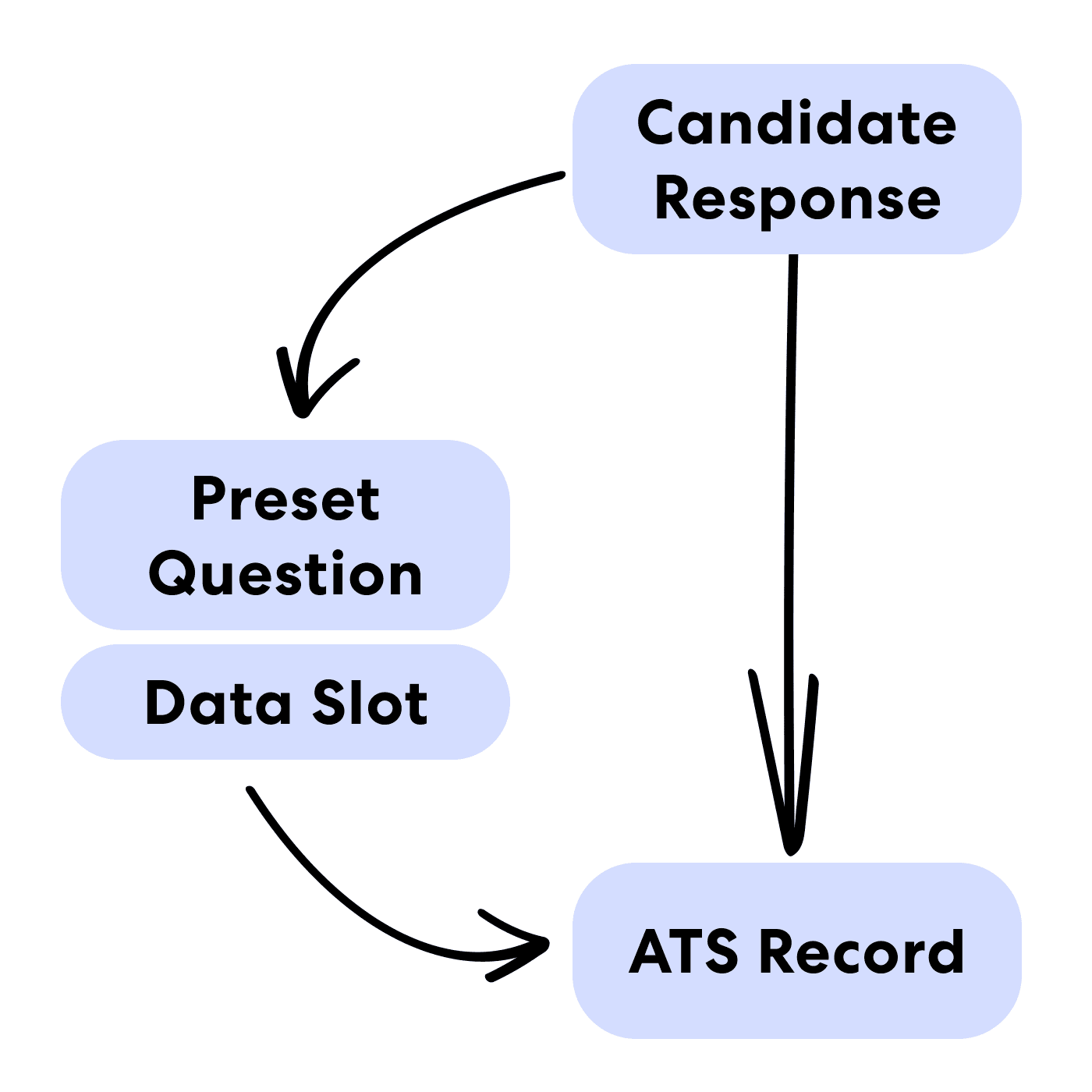
That model made a new object possible: the preset question. A preset is a question we selected and trained to gather one specific piece of data and to understand however people phrase the answer. Ask "What’s your name?" and one candidate says "My name’s John Doe," another "I go by John Doe," and the bot extracts the name from both. We curated a library of the most common ones.
The design question was how to show that mapping. Users wanted to choose which ATS field data writes back to, and to understand what was being collected. The constraint: a preset question’s slot is defined by the bot and cannot be changed.
Three Ways to Build a Conversation
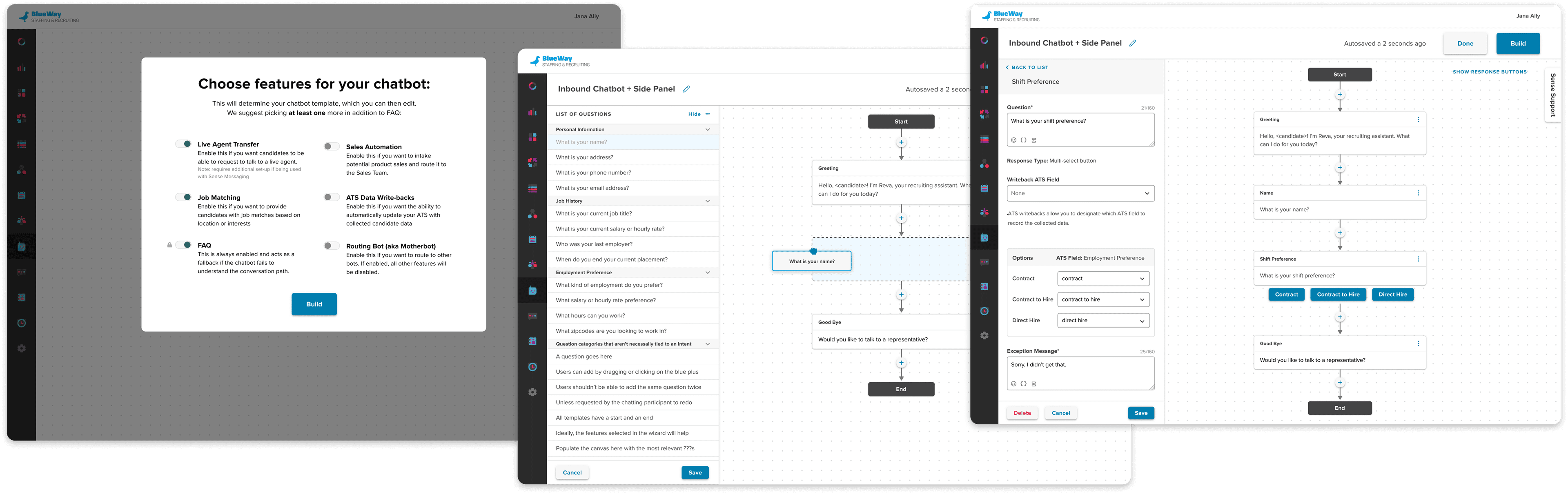
The first iteration treated questions as blocks of information. Add a categorised block, such as personal information, and its common questions land in sequence at once, which cuts the time to build a flow. Editing moved to a fixed right panel.
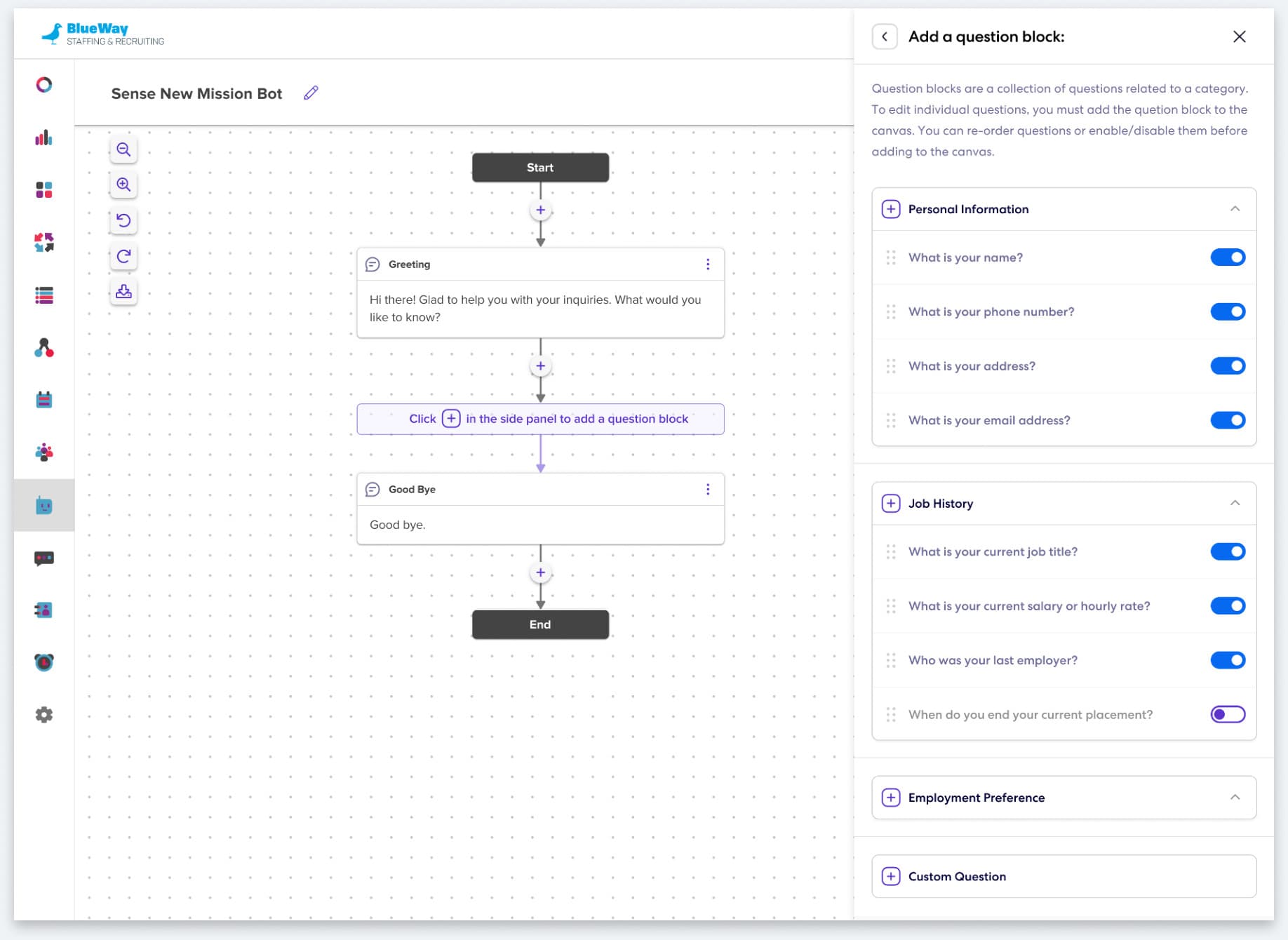
Iteration 1: add questions as categorised blocks.
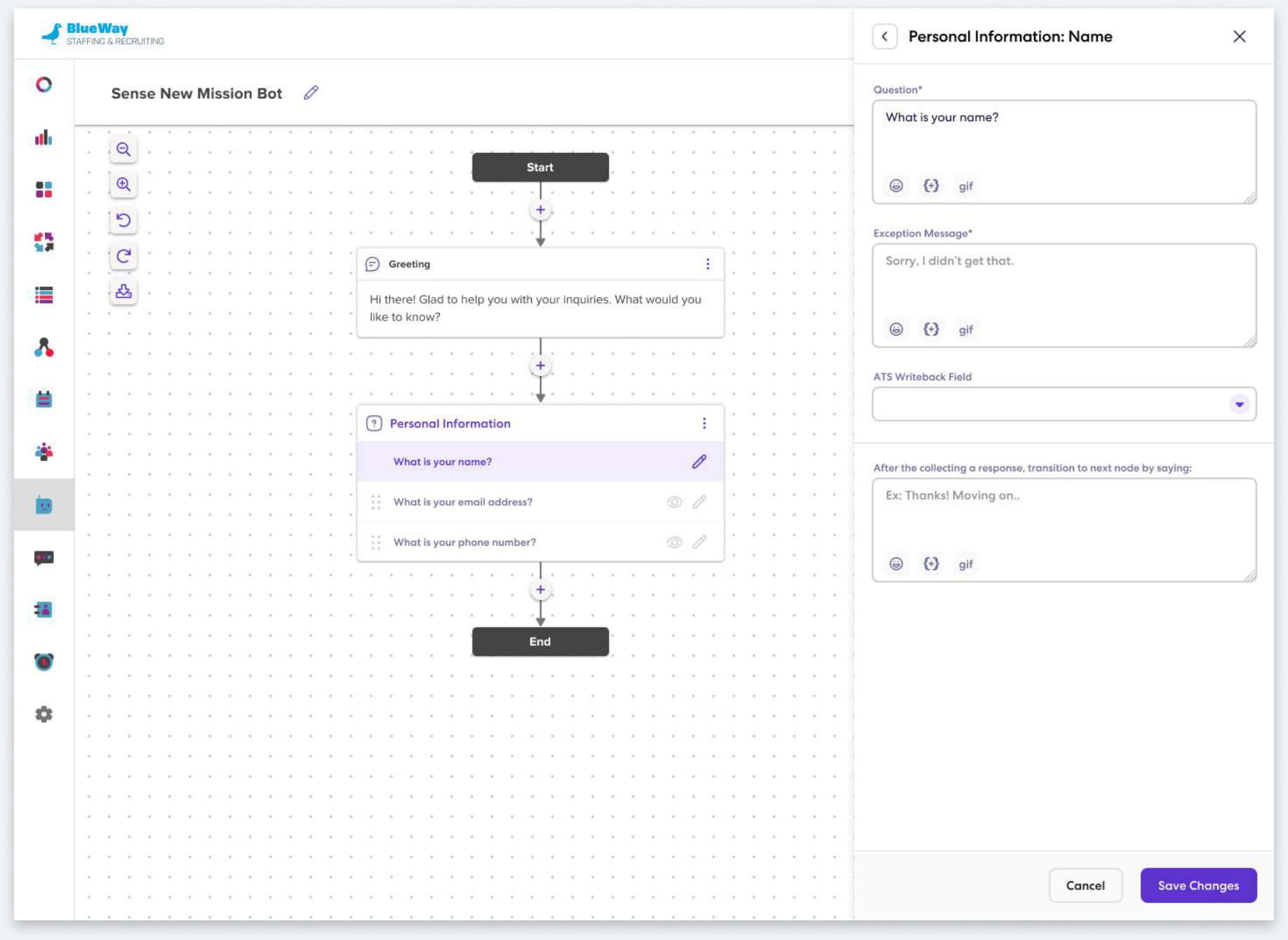
Iteration 1: edit a question in a fixed right panel.
The second surfaced the library inside the node itself. Creating a node shows a searchable list of preset questions in place, so people discover what exists while they build, and can add a whole block or one question at a time.
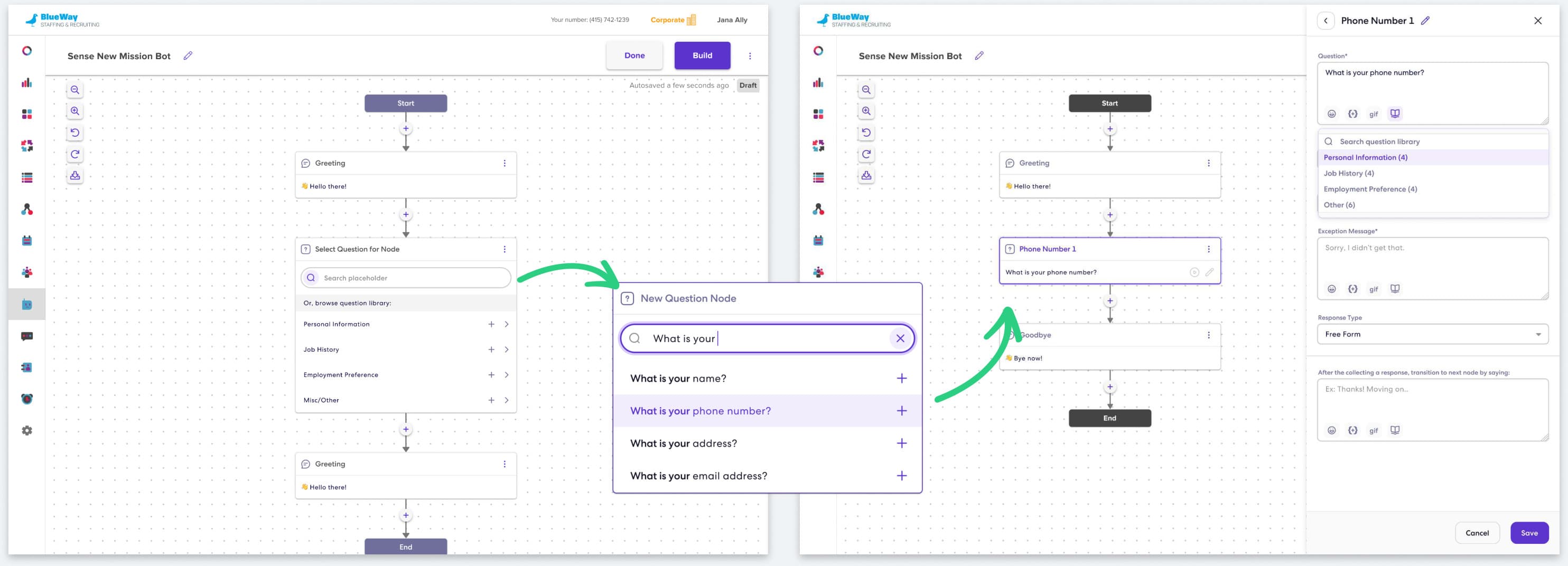
The Design Freeze
After more rounds, design reviews across teams and a near-final MVP more than once, we stopped. The director of engineering called a design freeze because the PM and I could not agree on adding one more required field: the data type each question collects.
The hypothesis for adding it: a "data captured" field would drive adoption of presets and make data more accurate, because it would auto-detect the type as you typed a question and convert your custom question into the smarter preset equivalent, so nobody would have to convert by hand.
From a usability standpoint I disagreed, for three reasons.
- It was redundant: we already had a data validation field, and this would not replace it.
- It was error-prone and confusing: the field auto-fills as you type, but if you then pick a type by hand your question silently converts into a preset.
- It needed a lot of copy to explain, and our users do not read that copy.
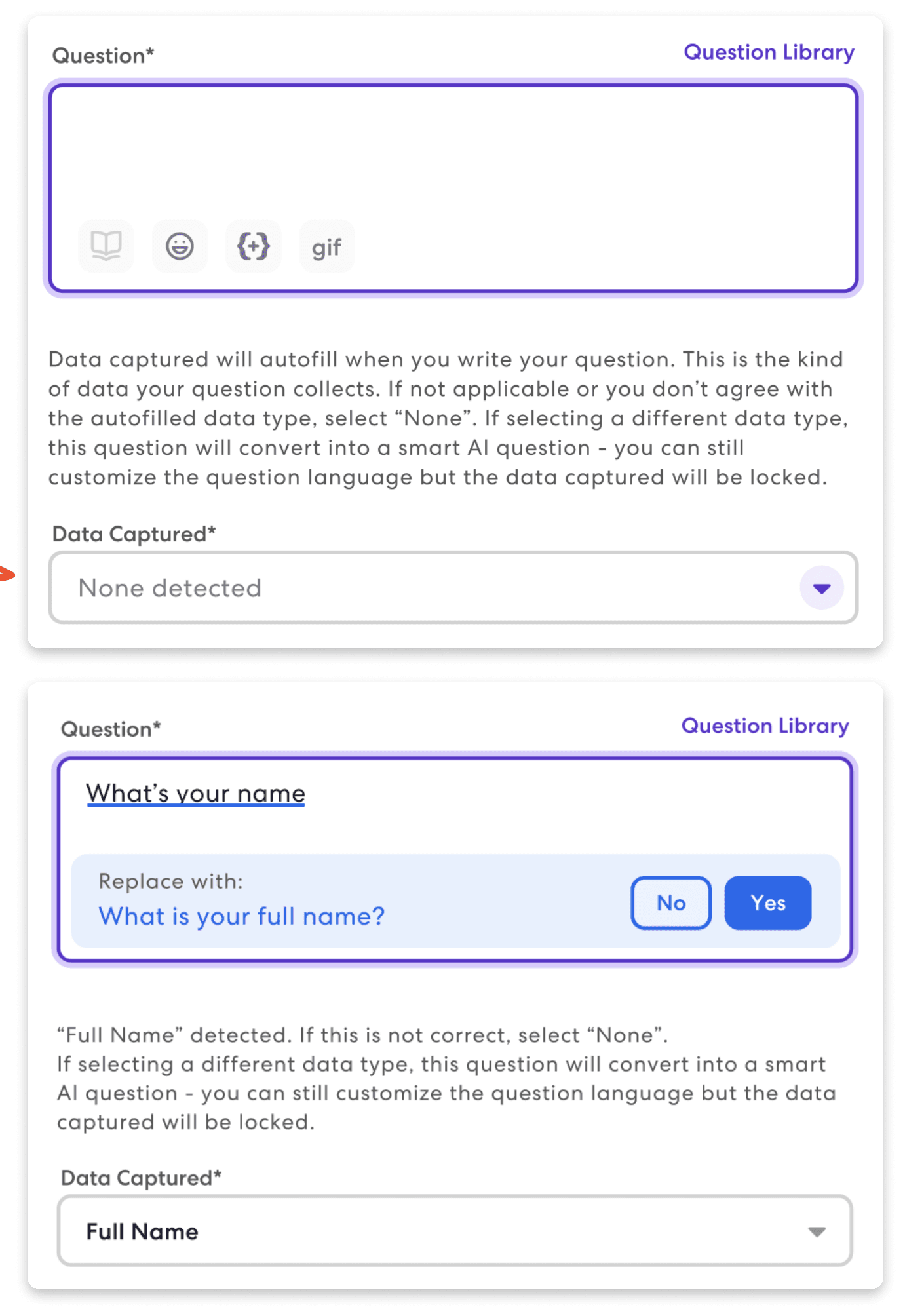
Six Recruiters Settle It
To end the debate I ran a user test with people who would actually use the thing. Two goals: get feedback on two designs for adding a question, one creation-focused and one discovery-focused, and find out whether recruiters understood "data captured" as shown. Unmoderated, on UserTesting, with six participants from staffing and HR of average to advanced web skill.
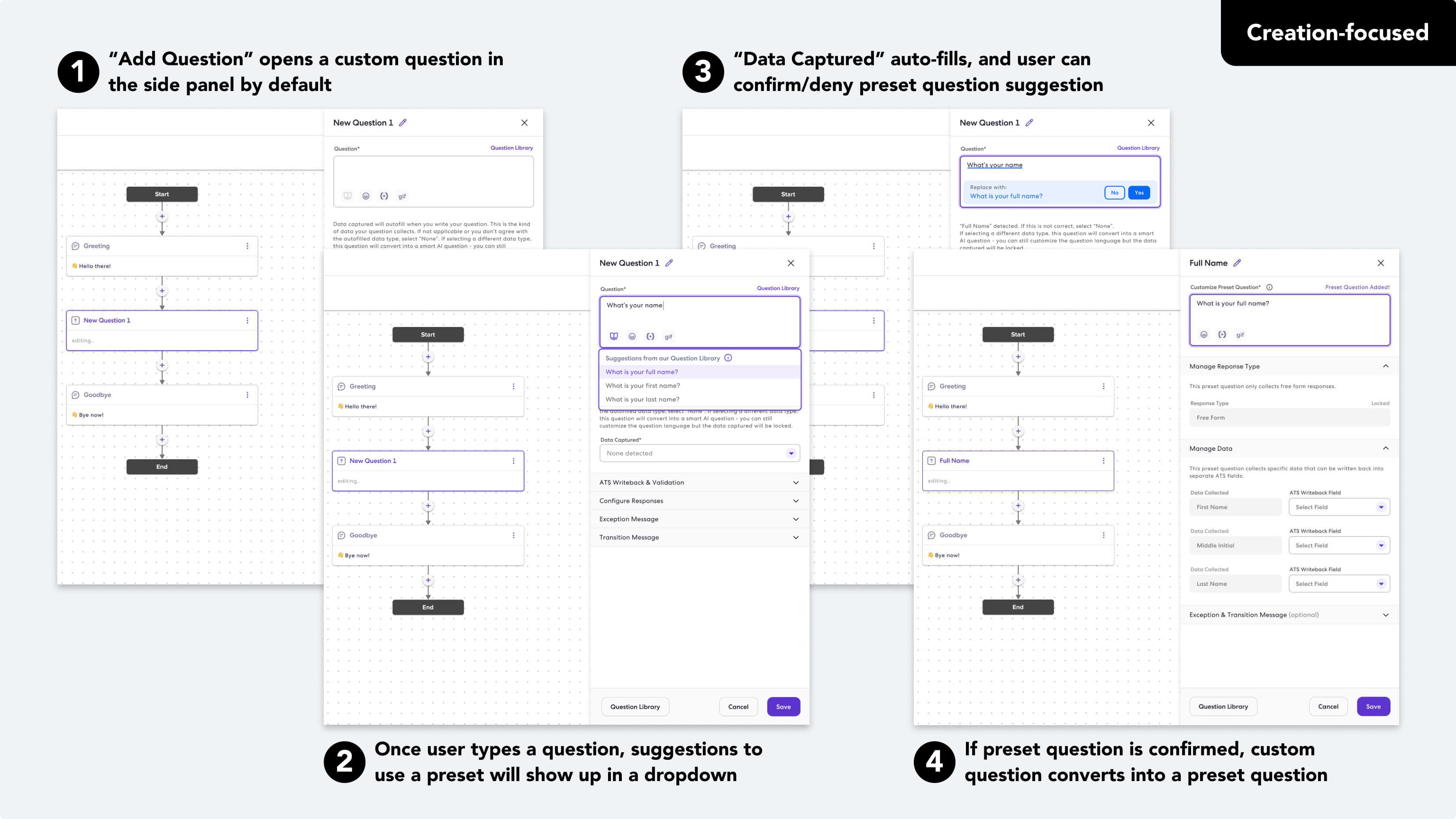
Creation-focused: straight into editing, with Data Captured as the second field.
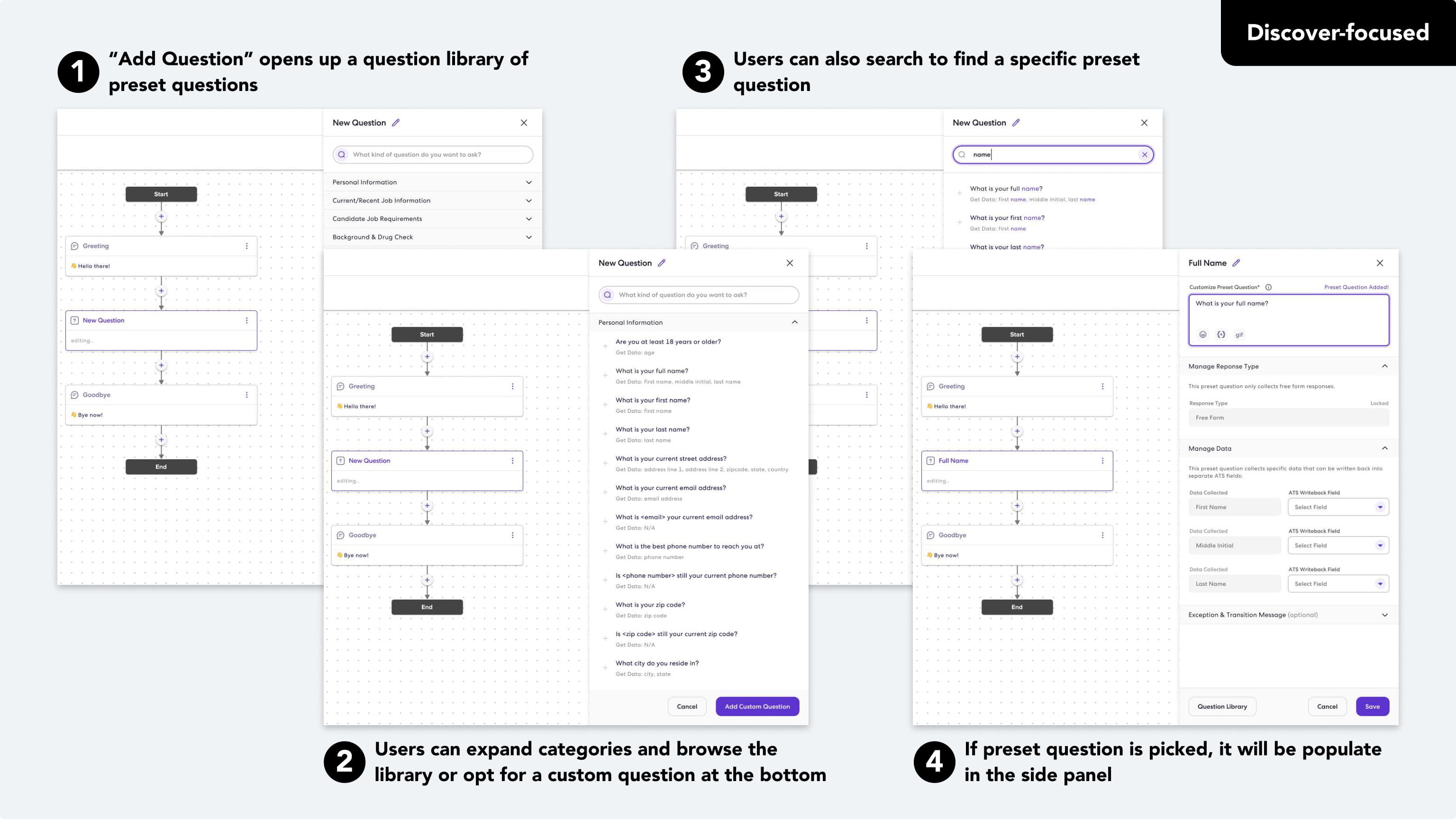
Discovery-focused: the library first, custom question at the bottom, Data Captured as the first field.
Three preferred discovery-focused, three preferred creation-focused. All six failed to understand data captured, found it frustrating, and ignored the copy explaining it in both prototypes.
The split on layout was a coin toss. The field was not. That was the answer the team needed, and it came from users rather than from either of us.
What Shipped
The MVP went live on May 5th, 2023, library first. Opening the library on "Add question" lets people discover presets on their own, which is the adoption we wanted, with a custom question always one click away at the bottom.
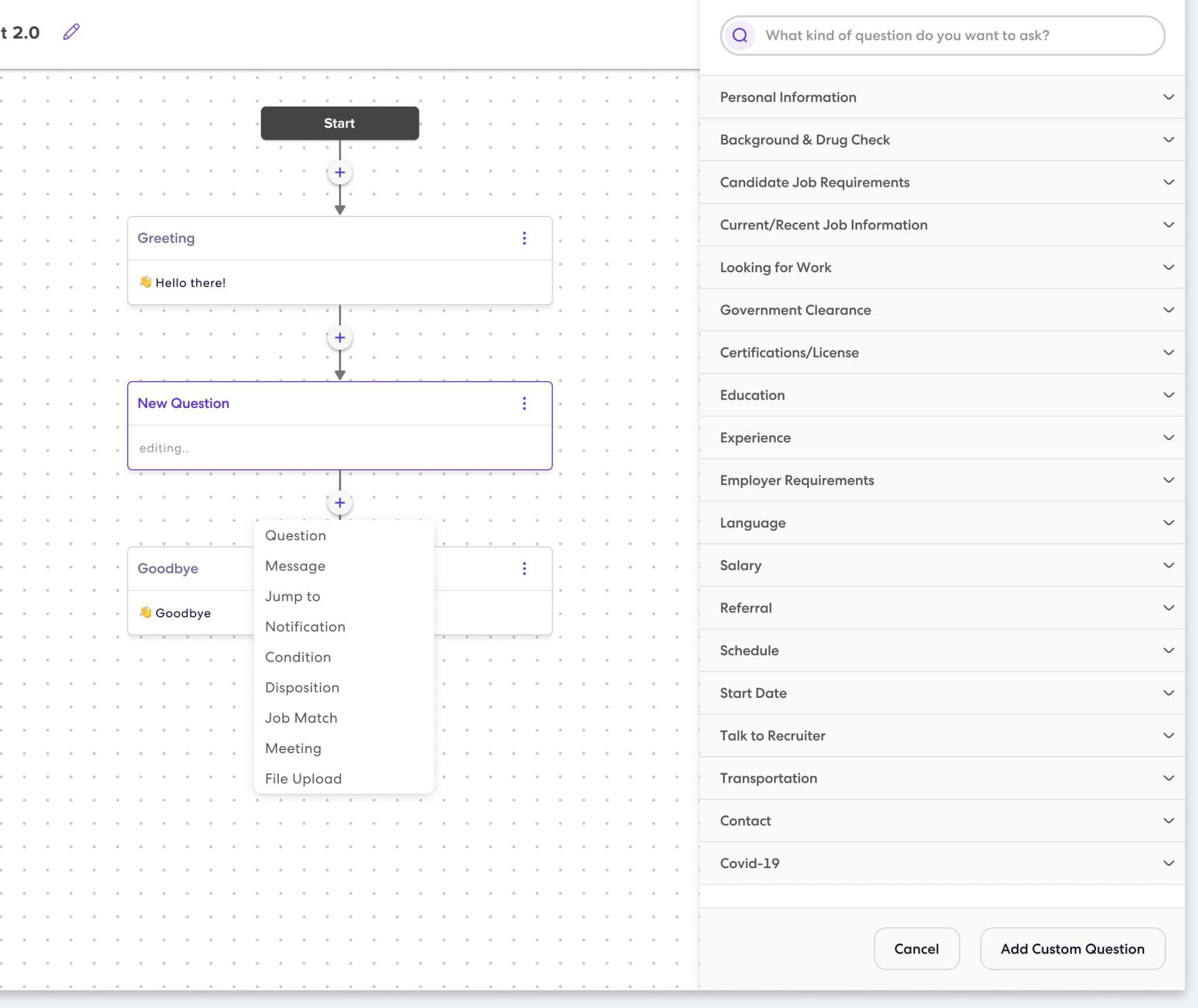
We keep watching adoption, and launched a "Copy to Chatbot 2.0" flow to move existing bots across. The goal is to sunset 1.0 within a few months of launch.
Outcome
A little over a month in, most questions being built were still custom, and about half of those had a preset equivalent. We did not expect full conversion yet, but it says product education has work to do before people know what the library can do for them.
| Questions in use | Count | Share |
|---|---|---|
| Custom | 491 | 63.5% |
| Preset | 282 | 36.5% |
Custom
- Count
- 491
- Share
- 63.5%
Preset
- Count
- 282
- Share
- 36.5%
| Custom questions | Count | Share |
|---|---|---|
| Preset available | 259 | 52.7% |
| No preset available | 232 | 47.3% |
Preset available
- Count
- 259
- Share
- 52.7%
No preset available
- Count
- 232
- Share
- 47.3%
Candidates, meanwhile, rate Chatbot 2.0 conversations higher than 1.0.
| Month | Chatbot 1.0 | Chatbot 2.0 |
|---|---|---|
| January 2023 | 4.4 | — |
| February 2023 | 4.4 | — |
| March 2023 | 4.5 | 5.0 |
| April 2023 | 4.5 | 4.6 |
| May 2023 | 4.5 | 4.6 |
January 2023
- Chatbot 1.0
- 4.4
- Chatbot 2.0
- —
February 2023
- Chatbot 1.0
- 4.4
- Chatbot 2.0
- —
March 2023
- Chatbot 1.0
- 4.5
- Chatbot 2.0
- 5.0
April 2023
- Chatbot 1.0
- 4.5
- Chatbot 2.0
- 4.6
May 2023
- Chatbot 1.0
- 4.5
- Chatbot 2.0
- 4.6
- Adoption: preset versus custom questions in use.
- Candidate friction: the feedback node keeps collecting experience data.
- Builder experience: NPS and CSAT surveys with the recruiters who build bots.
Two lessons. Data is king: when stakeholders need a consensus, reframe the problem around the user’s interest and let a test point the way. And AI-assisted creation tools are still new to most people: our audience’s technical confidence varies, and erring on the side of over-explaining builds the trust the feature needs.